
Customers & sites
Customer records, job addresses and a full history per site.

OxaamPro connects customers, teams, field work, documents and invoicing in one operational workspace.
Payment by bank transfer · activation after validation
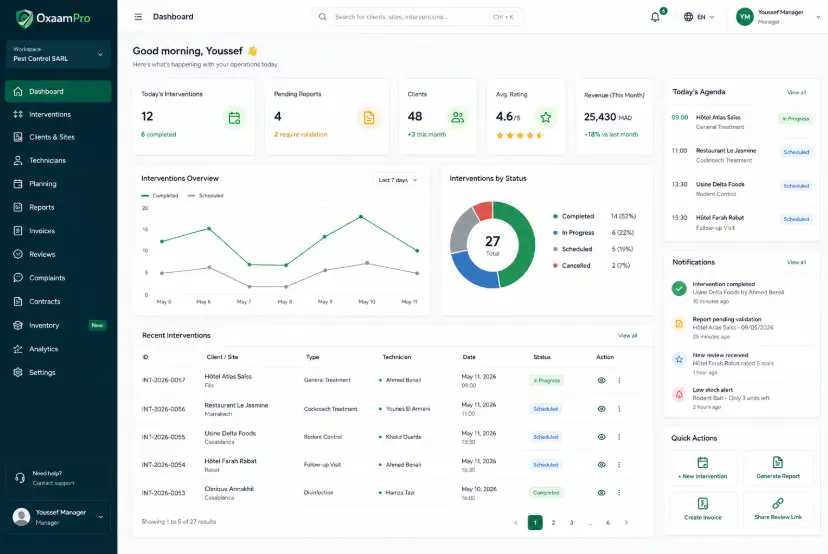
Six linked stages: what is entered at one feeds the next. The customer opens the job, the field writes the report, the report becomes the invoice, and the review comes back to the technician.
The whole chain
Six modules writing to the same records: what the technician enters on site feeds the report, the invoice and the statistics.
Customer records, job addresses and a full history per site.
Scheduling, assignment, statuses and written instructions for every visit.
Job reports and intervention sheets generated from field data.
Compliant invoices, server-recomputed totals and unpaid follow-up.
One review link per job, rated per customer and per technician.
Consumption declared on site, threshold alerts and derived figures.
Every step writes to the same records: nothing is re-entered between the office and the field.
Company, services, legal details and document numbering.
Customers, jobs, dates and assigned technicians.
The technician records photos, products, notes and signatures on site.
Report, invoice and review link generated from the same data.
The manager sees what is scheduled, what is in progress and what is still to invoice, without switching tools.
A mobile interface built for one hand, that works on a work phone and a slow connection.
No price, no invoice and no other customer is visible on the field surface.
On issue, a document freezes its data: changing your logo or address tomorrow does not rewrite yesterday’s invoice.
Not a translation: the documents, the legal details and the languages are the ones your customers expect.
ICE, RC, IF, Patente, CNSS and RIB printed in the invoice footer, amount written out in words.
Interface in French, Arabic and English, with a genuine right-to-left Arabic layout.
Every record carries your company identifier: no other company can read it.
A technician interface built for Android and a 3G connection, with large touch targets.
OxaamPro starts from pest-control operations and serves the same flow to other field-service work.
Treated zones, products used, photos and an intervention sheet for every visit.
One customer, several addresses, a history per site and a single point of contact.
Mobile teams, written instructions and proof of visit for every site.
The limits shown are your subscription’s: jobs over the period and active technicians.
299.00MAD / month
You create your workspace, choose a plan and send your transfer proof. Our team validates the payment, then the workspace opens.
Yes. Every record carries your company identifier and no query reaches it without one. Another company cannot read your customers, your jobs or your documents.
No. The field surface shows no price, no invoice and no subscription plan — only the jobs assigned to them.
An issued document keeps a frozen copy of your data. Changing your logo, your address or a service name alters no document that was already issued.
Create your workspace, then send your transfer proof when you are ready to activate the subscription.